The Zenoh Router
For scenarios where peers cannot directly reach each other — different networks, NAT, cloud-to-edge — Zenoh provides a router (zenohd).
Starting the Router
zenohdBy default the router listens on tcp/[::]:7447 and enables multicast scouting on the LAN.
Custom Configuration
Create config.json5:
{
  mode: "router",
  listen: {
    endpoints: ["tcp/0.0.0.0:7447", "udp/0.0.0.0:7447"],
  },
  scouting: {
    multicast: { enabled: true },
  },
}
zenohd --config config.json5Connecting Clients to the Router
let mut config = zenoh::config::default();
config
    .connect
    .endpoints
    .push("tcp/router.example.com:7447".parse().unwrap());

let session = zenoh::open(config).await.unwrap();
Router Topology
Routers are not limited to chains — they can be interconnected in any topology, including mesh networks where each router has multiple peers. Zenoh's link-state routing algorithm automatically computes the optimal path through the graph and reroutes around failures.
A simple chain spanning cloud-to-edge-to-device:


A mesh of routers across data centres and edge sites:
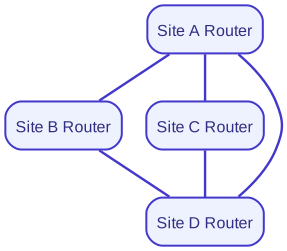
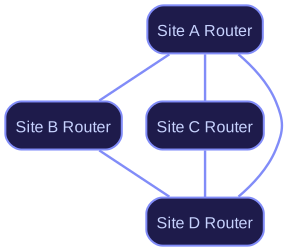
Each hop adds minimal latency. Whether the deployment is a linear chain, a star, or a full mesh, the application code is identical — topology is a configuration concern, not an API concern.
Continue to First Pub/Sub.